TL;DR: MCPs are not efficient. Code execution makes tool usage intelligent, consistent, time efficient, and cost efficient while providing an additional layer of security between the data and the AI.
Introduction
“Recently, I was talking with my colleague Braden about MCPs, tooling in AI, and token usage. Our team develops LuumenAI, the intelligence used in our observability and automation platform for monitoring ERP environments. As we got deeper into the conversation, I remember saying something along the lines of, “MCPs might become the NFTs of AI.” A bit hyperbolic, but I believe MCPs are a fad that will eventually die out as more practitioners grow disillusioned and move on.
For me, something never quite fit about the concept of MCPs in the way they were originally described or implemented. As it turns out, the creators of the Model Context Protocol (MCP), Anthropic, have come to a similar conclusion.
This whitepaper is about an expensive MCP lesson we learned the hard way: Three cost spikes that hit $100, then $300, then $900 per day in an environment with zero users and zero paying customers – just a handful of developers testing the system.
Here’s what went wrong, why the standard fix isn’t enough, and what we learned that actually works.
Part I: The Problem
First, What is MCP?
MCP is an open standard for connecting AI assistants to the systems where data lives, including content repositories, business tools, and development environments. The purpose of MCP is to help frontier models produce better, more relevant responsesThis sounds compelling, in theory, as it’s an important problem to try to solve in AI efficiency. But in practice, the MCP standard has failed. Anthropic itself has stated that traditional MCP patterns increase agent cost and latency. And results from an experiment by Cloudflare have found that MCP tools are inefficient, costly, and make the models “dumber”.
How AI Pricing Works
Before we can talk about why AI is expensive, we need to understand how AI actually processes text. The answer is tokens.
A token is the fundamental unit that a language model works with. When you send text to an AI, it doesn’t read words or characters the way humans do. Instead, it breaks everything down into tokens, which are chunks of text that the model has learned to recognize. A token might be a whole word like “hello,” a partial word like “ing” or “tion,” or even just a single character for uncommon symbols.
Modern LLMs use an algorithm called Byte-Pair Encoding (BPE) to do this. BPE starts with individual characters and iteratively merges the most frequently occurring pairs until it builds up a vocabulary of common sub-word units. This is why common words like “the” become single tokens, while rare or technical terms get split into multiple pieces. For example, “unhappiness” might become three tokens: “un,” “happi,” and “ness.”
A rule of thumb for English text is that 1 token equals about 4 characters, or roughly 0.75 words. So, 1,000 tokens is approximately 750 words, but this can vary significantly. Code, technical documentation, and non-English text often tokenize less efficiently, meaning more tokens per word.
The reason AI providers charge by token comes down to computational cost. Every token that goes into a model (input) and every token that comes out (output) requires processing power. Input tokens and output tokens are often priced differently. Output tokens typically cost more because generating new text requires the model to run inference step by step, predicting one token at a time.
Let’s look at current pricing for Anthropic’s Claude 4.5 models:
| Model | Input (per 1K tokens) | Output (per 1K tokens) |
| Claude Opus 4.5 | $0.005 | $0.025 |
| Claude Sonnet 4.5 | $0.003 | $0.015 |
| Claude Haiku 4.5 | $0.001 | $0.005 |
Notice that output tokens cost 5x more than input tokens. This pricing structure means that a chatty AI that generates long responses will cost significantly more than one that gives concise answers. It also means that any architecture that repeatedly sends large contexts back and forth will accumulate costs quickly.
To put it in perspective: If you’re running 100,000 tokens through Claude Sonnet 4.5 (a mix of 70K input and 30K output), that’s roughly $0.21 + $0.45 = $0.66 per request. Run that 1,000 times a day and you’re looking at $660/day. Run it across 100 users making 10 requests each? Same math.
Why MCP Bleeds Tokens
There are two compounding problems with how MCP handles context.
First, tool definitions load upfront. When you give an AI access to tools (functions it can call), each tool needs a definition. This definition includes the tool’s name, description, parameters, parameter types, and often examples of when to use it. A well-documented tool might be 100-300 tokens. Multiply that by 90 tools and you’re looking at 9,000 – 27,000 tokens of tool definitions sent with every request.1
To put that in dollar terms: At Claude Sonnet 4.5 rates, 9,000 tokens cost about $0.027 and 27,000 tokens cost about $0.081. That doesn’t sound like much, but remember this cost is incurred on every single request – even before the user says anything useful. Run 10,000 requests per day and you’re looking at $270 – $810 daily just for tool definitions.
It gets worse. In the standard MCP approach, all tool definitions get sent with every request, even when the user’s query only needs one or two tools. That’s because the model needs to see all available options to decide which ones to use.
With LuumenAI, we had over 90 tools from just 5 implementations. This meant every base request started at roughly 20,000 tokens before the user typed anything. A simple “hello” message: 20,000 tokens – where the actual message was 1 token and the other 19,999 were tool definitions sitting there waiting to be useful.
Second, iterative calls compound context. When the model calls a tool and gets a result, that result is added to the context… then the model is called again with the original context PLUS the tool result. Then, if the model calls another tool, you get original context PLUS first result PLUS second result.
Each iterative call compounds the previous context, as illustrated in the following diagram.
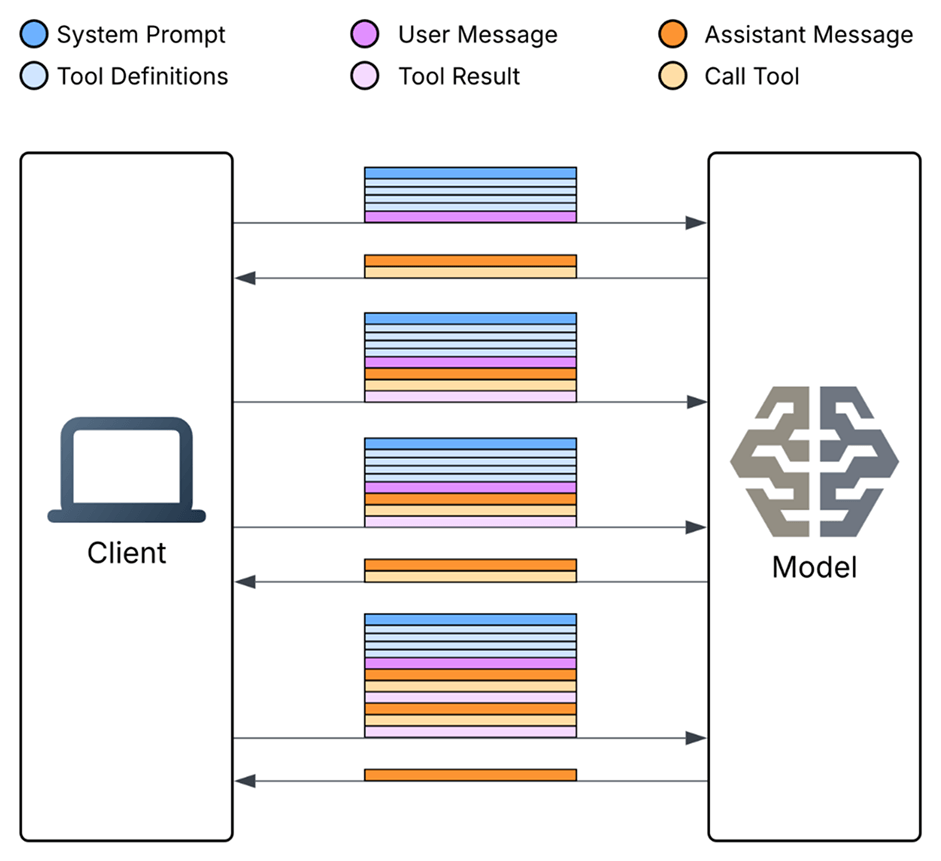
Two tool calls compounding one user message
The “Lost in the Middle” Problem
Current AI models are good at writing code but struggle to sustain long conversations with large amounts of context. One reason this happens is due to the “Lost in the Middle” problem.
The “Lost in the Middle” phenomenon was documented by Liu et al. in their 2024 research. It reveals a critical limitation in how language models process information within their context windows. Their experiments on multi-document question answering and key-value retrieval tasks demonstrated that model performance follows a distinctive U-shaped curve. Accuracy is highest when relevant information appears at the very beginning or end of the input context, but degrades significantly when critical data is positioned in the middle.
This occurs because of primacy and recency biases. Models tend to “remember” what they saw first and last, while information in the middle gets overshadowed. In some cases, GPT-3.5-Turbo performed worse with middle-positioned documents than when operating without any documents at all.
For our purposes, this means that as tool results accumulate in the context window, the AI increasingly struggles to locate and utilize the most relevant information, leading to degraded reasoning quality. The model literally gets “dumber” as context grows.
Part II: What Went Wrong with LuumenAI
We experienced this ourselves with LuumenAI’s early implementation. In the first version, we created a ReAct agent and connected tools to it. We tracked the agent’s decisions and had some cool visuals of the AI’s workflow. As we continued to iterate on the agent’s capability, token count skyrocketed and at times the model seemed to become less functional.
In this first iteration of LuumenAI, we experienced three major token spikes – with zero users. The first spike was ~$100 a day, the second was $300 a day, and the third was $600 – $900 a day. For an (at the time) unlaunched product, this was a serious problem.
Let’s look at the pitfall in each situation.
Spike #1: The Summarization Loop ($100/day)
First, we implemented a summarization tool that fed large amounts of vulnerability information into the LLM to output a summary for quick, concise reading. The problem was that we ran this summary for every server and every vulnerability on each of those servers every hour. It quickly became large amounts of text being repeatedly processed on our development machines.
| Servers | Vulns/Server | Runs/Day | Tokens/Run | Daily Tokens | Daily Cost |
| 3 | ~17 | 24 | 1.17M | 28M | $100 |
| 10 | 20 | 24 | 5M | 120M | $648 |
| 100 | 20 | 24 | 50M | 1.2B | $6,480 |
| 1000 | 20 | 24 | 500M | 12B | $64,800 |
1000 servers is a relatively normal number. Some companies have over 200 alone.
Just 1000 servers with 20 vulnerabilities costs $65,000 a day! We quickly implemented a caching layer and deduped our processing to bring things back into line.Lesson learned: Never ask the AI to do the same work twice.
Spike #2: Tool Definition Overload ($300/day)
Next, we implemented a large suite of tools (70+ ServiceNow tools, 15+ Dynatrace tools, and others) which immediately brought every base request to 20,000 tokens. Sending the word “Hello” was 20,000 tokens. Anything more complicated requiring tools could push token counts to over 125,000.
| Users | System Prompt | Tool Definitions | User Message | Cost |
| 1 | ~4.5k | ~15.5k | 1 | ~$0.10 |
| 10 | ~4.5k | ~15.5k | 1 | ~$1.00 |
| 1000 | ~4.5k | ~15.5k | 1 | ~$100.00 |
1000 Users sending just “Hello” would cost ~$100.
That’s ~18.5x the cost for that one token!
We quickly implemented optimizations and observability beyond what we already had to try to better understand how the token counts were getting so large. We culled tools we weren’t using yet and added dynamic tool insertion into prompts. That got us back in line, but left us with a lingering problem: What happens when we actually need 90 critical tools?
Lesson learned: Tool definitions are expensive. Give the model only what it needs when it needs it.
Spike #3: The Perfect Storm ($600-$900/day)
Finally, we aggressively used the models to do huge multi-step processing on text-rich files. Doing this unintentionally created a combination of our first and second mistakes. There weren’t many tools anymore, but the large blocks of text being processed en masse through many stages still created those large token counts – which get replicated over each step. The result was two days of $600 and $900 dollar spikes, respectively.
| Step | Input Tokens | Output Tokens | Total Tokens | Cost |
| User Msg | 5,000 | 0 | 5,000 | ~$0.03 |
| Tool 1 | 5,000 | 10,000 | 15,000 | ~$0.08 |
| Tool 2 | 15,000 | 10,000 | 25,000 | ~$0.14 |
| Tool 3 | 25,000 | 10,000 | 35,000 | ~$0.19 |
| Tool 4 | 35,000 | 10,000 | 45,000 | ~$0.24 |
| AI Response | 45,000 | 500 | 45,500 | ~$0.25 |
| ~$0.92 |
Total cost is the SUM of all costs!
| Users | Requests | Total |
| 1 | 1 | $1 |
| 10 | 1 | $10 |
| 100 | 1 | $100 |
| 10 | 10 | $100 |
| 100 | 10 | $1000 |
100 users making just 10 complex requests a day costs $1000.
10,000 Users making 10 complex requests a day costs $100,000 a day! This caused us to reevaluate the core architecture of our system.
Lesson learned: Iterative tool calling compounds costs. Find architectures that minimize round trips between the model and external systems.
Part III: Anthropic’s Fix (And Why It’s Not Enough)
While I was writing this article, Anthropic came out with their solution to the MCP problem. It is a step forward. But using MCP feels like running a race wearing a backpack full of rocks – and Anthropic’s solution is to add more straps to help better distribute the weight. Yes, it’ll get you to the finish line, but you’ll be exhausted and you’ll have made lots of suboptimal decisions along the way. A better solution is to just drop the backpack.
Anthropic’s Three New Features
In their new article, Anthropic shared how Claude will start to use dynamic tooling and a level of code execution (sometimes) to be more efficient with token usage. They introduced three new features:
1. Tool Search Tool: Instead of loading all tool definitions upfront (which Anthropic admits can hit 134K tokens internally), Claude can now search for tools on demand. Tools are marked with defer_loading: true, and Claude only sees the Tool Search Tool itself (~500 tokens), plus always-loaded tools. When Claude needs a capability, it searches. This keeps context windows lean but adds another inference step.
2. Programmatic Tool Calling: Claude can now write code to orchestrate tools instead of making individual API round-trips. This allows for parallel execution and prevents intermediate results from piling into context. Anthropic claims 37% reduction in token usage and reduced latency for multi-step tasks.
3. Tool Use Examples: Sample calls alongside schemas to improve accuracy. Anthropic’s testing showed parameter handling accuracy jumping from 72% to 90%. Schemas alone don’t communicate real-world usage well enough.
This does move us closer to a complete solution, but why keep piling on?
This Isn’t the Answer
The fundamental problem with Anthropic’s solution is that it’s complexity stacked on complexity. They’re not solving the underlying architectural issue; they’re adding more layers to manage the symptoms.
It’s still MCP at the core. Tool Search Tool and Programmatic Tool Calling are bandages over the MCP wound. You’re still defining tools in the MCP format, still dealing with MCP server connections, still working within a protocol that was designed for a different mental model. The complexity doesn’t disappear; it just gets shuffled around.
The training data gap. As Cloudflare pointed out: LLMs have seen millions of open source projects with real TypeScript and Python code. They’ve seen a tiny set of contrived tool-calling examples constructed by their own developers. Making an LLM perform tasks with tool calling is like putting Shakespeare through a month-long class in Mandarin and then asking him to write a play in it. It’s just not going to be his best work.
Inference overhead. With traditional tool calling, the output of each tool call must feed into the LLM’s neural network – just to be copied over to the inputs of the next call. Even with Programmatic Tool Calling, you’re still running inference to generate the orchestration code, when you could just, well, write code that calls APIs directly.
Feature fragmentation. These features are in beta and require specific headers. Implementation requires the advanced-tool-use-2025-11-20 header. The features aren’t mutually exclusive so you end up layering them: “Tool Search discovers tools, examples ensure correct invocation, programmatic calling handles orchestration.” That’s three systems to manage what should be just one.

Comparing the steps to using MCP vs. using Code Execution
From the start of working with AI, I always thought it was odd that we didn’t just call APIs. Like, it can write code and read docs. Why wouldn’t it just do curl requests or something similar? This is a very simplified take, but it is also not infeasible at this time.
Part IV: The Real Solution
Code Execution Over APIs
Cloudflare’s “Code Mode” approach represents what I believe is the correct direction. Instead of exposing MCP tools directly to the LLM, they convert MCP tools into a TypeScript API and ask the LLM to write code that calls that API.
The results are interesting. LLMs can handle many more tools, and more complex tools, when those tools are presented as a TypeScript API, rather than directly. This makes sense: LLMs have an enormous amount of real-world TypeScript in their training set, but only a small set of contrived examples of tool calls.
The approach shows its strength in multi-step operations. With traditional tool calling, intermediate results pile into context whether they’re useful or not. When the LLM writes code, it can skip all that and only read back the final results it needs. The code handles loops, conditionals, and data transformations. The LLM generates the logic once, the sandbox executes it, and only the relevant output returns to context.
The key insight: MCP is really just “a uniform way to expose an API for doing something, along with documentation needed for an LLM to understand it, with authorization handled out-of-band.” We don’t have to present tools as tools. We can convert them into a programming language API. The LLM writes against that API and a sandbox executes it.
How It Works
Instead of presenting tools directly to an LLM for individual invocation, we expose them as a programmatic API (typically TypeScript or Python) and let the model write code that orchestrates multiple tool calls. The code runs in a secure, isolated sandbox. This execution environment is deliberately restricted from general network access and can only interact with the specific APIs we provide.
The sandbox acts as a controlled runtime where the AI-generated code executes without the ability to access unauthorized resources or leak data. It can call our predefined APIs, process results in memory, filter and transform data, and only return the final curated output back to the model’s context. This means intermediate results stay within the sandbox and never bloat the context window. We’re talking about potentially large payloads: 10,000 spreadsheet rows or full document contents that never touch the LLM.
Cloudflare implements this using V8 isolates, which are lightweight JavaScript execution environments that can spin up in milliseconds and provide strong security guarantees. The key architectural shift is that tool definitions become filesystem-based TypeScript interfaces that the model can discover and import on demand, rather than loading all definitions upfront into the context.
Anthropic states in one of their examples: “This reduces the token usage from 150,000 tokens to 2,000 tokens – a time and cost savings of 98.7%.”
Architecture Comparison
| Traditional MCP + Anthropic’s Fixes | Code Execution Approach |
| Load tool definitions → Tool Search → Inference to select → Tool call → Result to context → Repeat | Load TypeScript API docs → Generate code → Execute in sandbox → Return final result only |
| Multiple inference passes for multi-step tasks | Single inference pass generates full orchestration |
| Intermediate results bloat context | Only final results return to context |
| Limited training data for tool-calling format | Massive training data for TypeScript/Python |
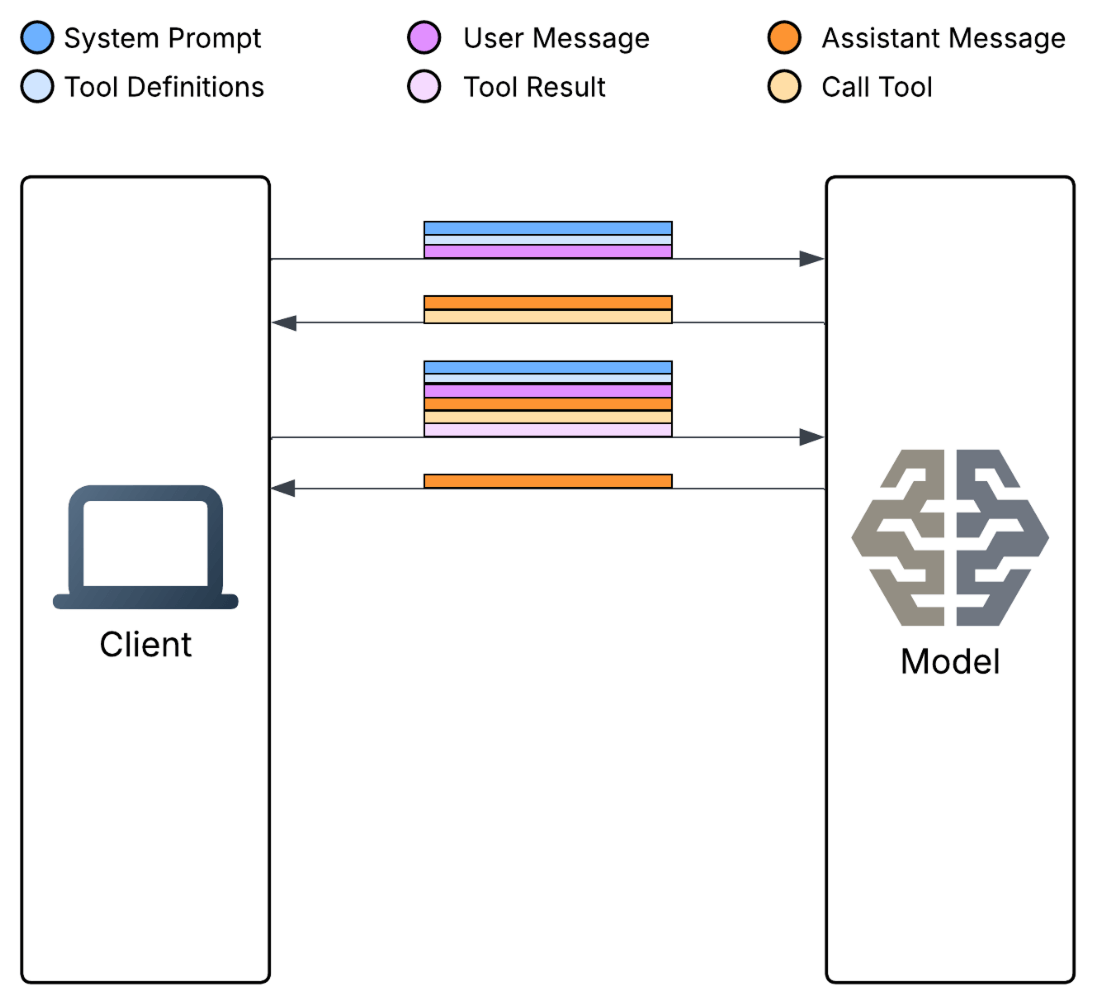
Same multi-tool call process as in the first image, but with Code Execution
Part V: How LuumenAI Is Solving It
LuumenAI’s solution creates specialized agents with code repositories that can execute specialized scripts and API calls written by the AI to interact with connections. This reduces the number of tools substantially while increasing accuracy and efficiency – and also reducing cost.
I want to be clear: We’re not fully there yet. LuumenAI is currently somewhere in the middle of this journey, using a hybrid approach as we continue to build toward full code execution. But we’re moving in that direction because the evidence is compelling, and every step we take reduces costs and improves quality.
Specialized Sub-Agents
Instead of giving an agent 90+ MCP tools and hoping it picks the right ones, we build specialized sub-agents. Each sub-agent has a focused domain (ServiceNow, monitoring, documentation) and a code-execution environment. When the AI needs to interact with a system, it doesn’t call a predefined tool. It writes a script against that system’s API, executes it in isolation, and returns only the relevant results.
By creating sub-agents we are able to limit tools to groups of agent specialties and minimized context data. A monitoring sub-agent only has monitoring tools. A documentation sub-agent only has documentation tools. These sub-agents can process a request and give only relevant data back to the main agent to reduce the overall context from compounding. Instead of one agent with 90 tools seeing 90 tool definitions, we have specialized agents each seeing 10-15 tools relevant to their domain.
Code Execution Environment
We implemented code execution to further optimize the tool calls in these agents. Rather than the model making sequential tool calls that each add to the context, it writes code that executes in a sandbox, processes results locally, and returns only the curated output.
The AI already knows how to write code. It’s been trained on millions of examples. Let it do what it’s good at.
This approach means:
- Context stays small because we’re not loading 90 tool definitions
- The AI’s responses are more accurate because it’s working in a paradigm it understands
- Costs drop dramatically because we’re not compounding token usage across inference passes
- We get a natural security boundary because the code executes in an isolated sandbox with only the permissions we grant.
A Real-World Example
LuumenAI is a co-pilot tool that works with systems engineers and Linux admins to manage SAP/ERP systems. It has access to the Luumen ecosystem, including monitoring tools, incident management and reporting, documentation, and more.
When a user creates a chat with the co-pilot, it has context to the client the user is working on, the exact system or set of systems the user is interacting with, and can use a suite of tools to get information about those systems and best practices/historical problem resolution for those instances or similar instances.
Let’s examine what happens when a user asks for current problems for the system they are viewing, along with any documentation that would help fix the issues. As outlined by Anthropic, the MCP approach requires that context be sent with EVERY request, meaning that every subsequent tool call and LLM call needs ALL the content from the previous calls, bloating the context dramatically. Code execution allows us to control, deterministically, how and what data we get. It allows us to process those results and provide a curated clean response back to the AI that reduces the number of tool calls (and layering of context info) and provides increased data security.
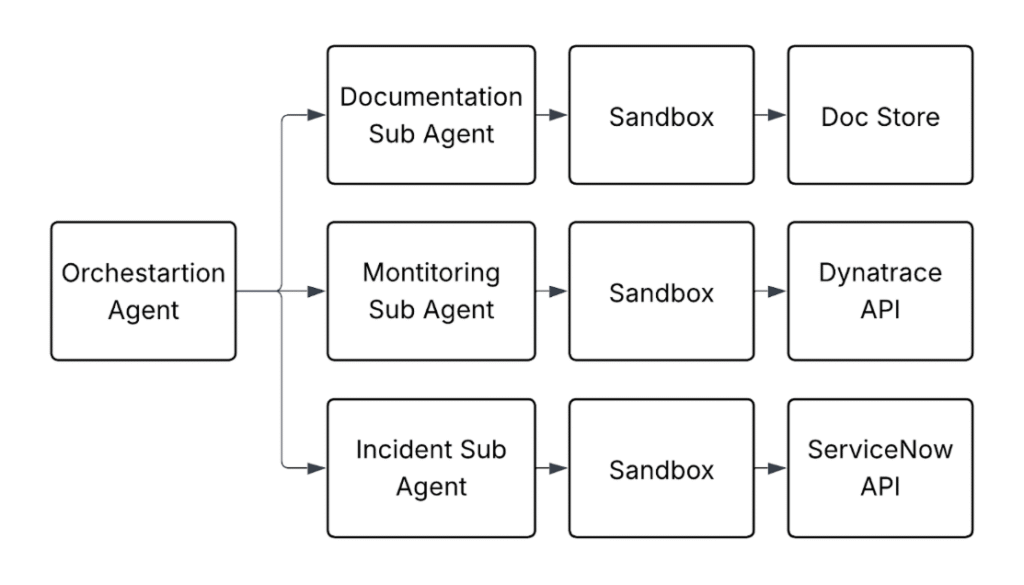
Rough example of Luumen multi-agent structure using Code Execution
The Results So Far
The combination of sub-agents and code execution transformed our cost structure. We went from $300-$900/day spikes with zero users to sustainable single-digit dollar costs during active development. More importantly, we built an architecture that can scale to real user loads without the exponential cost growth we were seeing before. This approach reduced our token usage by over 98% for complex multi-tool operations.
We’re continuing to push further toward full code execution as we develop LuumenAI. Every iteration gets us closer to the architecture we believe is the future of AI tooling.
| Metric | Before (MCP) | After (Code Execution) |
| Daily Cost (dev testing) | $300-$900 | $1-$5 |
| Tokens per complex request | 60,000-120,000+ | ~5,000-10,000 |
| Tool definitions loaded | 90 (all) | 10-15 (relevant) |
| Context compounding | Yes (exponential) | No (controlled) |
Conclusion: Drop the Backpack
AI costs are driven by tokens, and tokens accumulate faster than you might expect. Every system prompt, every tool definition, every intermediate result, and every response adds to the total. Without careful architecture, these costs can spiral out of control before you have a single paying customer.
Our experience with LuumenAI taught us three critical lessons:
- Caching and deduplication are essential. Don’t ask the AI to do the same work twice.
- Tool definitions are expensive. Give the model only what it needs when it needs it.
- Iterative tool calling compounds costs. Find architectures that minimize round trips between the model and external systems.
The path forward isn’t to avoid AI. It’s to be intentional about how you use it. Observability tools like Langsmith gave us visibility into where tokens were being consumed. Architectural patterns like sub-agents and code execution gave us control over that consumption. Together, they let us build an AI-powered product that delivers value without bankrupting us in the process.
Anthropic is building better backpacks. Cloudflare is showing us we don’t need the backpack at all. We’re taking it a step further: Build the agents around code execution from the start, not as a feature bolted on top of a tool-calling protocol.
Drop the backpack. Run the race.
Appendix: A Note on Prompt Caching
1 Prompt caching can mitigate the tool definition load on repeated requests. When enabled, AI providers cache the static portions of your prompt (like tool definitions) and charge reduced rates for cached tokens. For example, Anthropic charges ~90% less for cached input tokens.
However, it’s important to note that cached tokens are still not free. You’re paying less, but you’re still paying for every request that includes those tool definitions. At Anthropic’s rates, cached tokens cost $0.0003 per 1K tokens for Sonnet 4.5 (compared to $0.003 for uncached). For 27,000 tokens of tool definitions across 10,000 requests per day, caching reduces your cost from $810/day to $81/day. That’s a meaningful savings, but you’re still paying $81 daily just for tool definitions.
More importantly, caching helps with the cost problem but doesn’t solve the architectural issues of context bloat and the “Lost in the Middle” phenomenon. You’re still loading all those definitions into context. The AI is still potentially getting confused by irrelevant options. And you’re still compounding context with each iterative tool call. Caching is a band-aid, not a cure.
Appendix: Calculations
2 All cost calculations are using a standard Sonnet cost structure of 4/5 input tokens at $0.003 per 1,000 tokens and 1/5 output tokens at $0.015 per 1,000 tokens, then rounded to the nearest cent or dollar.
References
- Anthropic – Advanced Tool Use
- Anthropic – Code Execution with MCP
- Cloudflare – Code Mode: The Better Way to Use MCP
- Liu, N. F., Lin, K., Hewitt, J., et al. (2024). “Lost in the Middle: How Language Models Use Long Contexts.” Transactions of the Association for Computational Linguistics, 12, 157-173. arXiv:2307.03172
- Anthropic – Claude Pricing
- Hugging Face – Byte-Pair Encoding Tokenization

About the Author
Josh Greenwell
Software engineer at apiphani and co-founder of Culture Booster
Contact Us
- Tell us more about your business and what you need from automation and business software.
- One Financial Center
16th Floor
Boston, MA 02111 - Request a Quote: +1 (833) 695-0811